Third Party Tab in Rx Detail
The Third Party tab in Rx Detail contains adjudication details of the prescription and appears if a prescriptions is stopped due to an adjudication issue.
To learn more about the Third Party tab, select the expander icons  in the image below. For provincial specific fields and buttons, refer to Table 1.
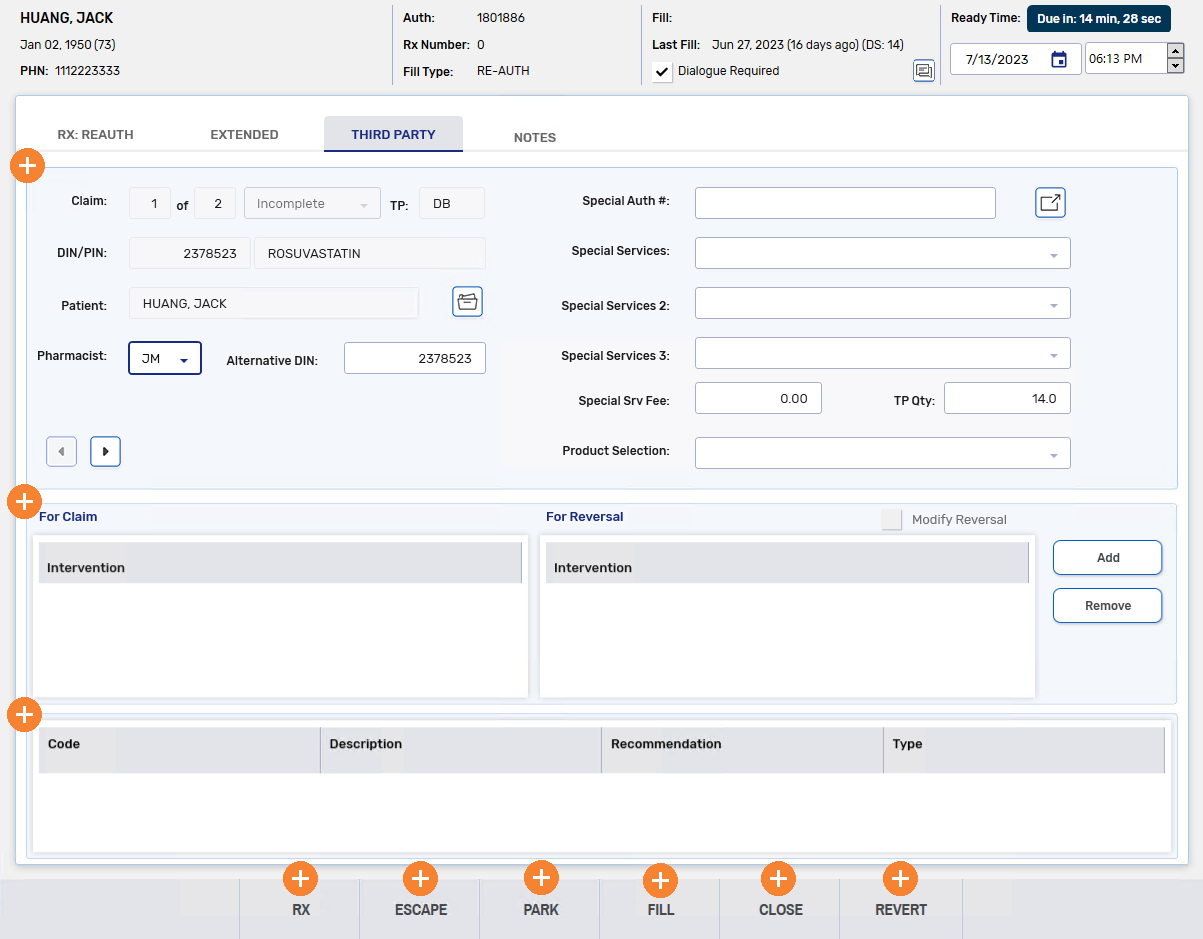
Table 1. Province specific fields and buttons in the Rx Detail Third Party tab.
| Third Party Tab Field | Province | Description |
|---|---|---|
| Fill Type | British Columbia |
Indicates the type of dispense that is being submitted. Fill Type defaults as follows:
Users can override the default value if needed by selecting a new option from the dropdown. |
| MMI/CS Codes | British Columbia |
The expander button To add MMI and CS codes, locate the applicable MMI header and select the applicable CS code underneath. Users can double-click on a code or single-click and select the right (>>) arrow button. MMI and CS codes are mandatory in certain prescribing or dispensing scenarios (refer to the Supplementary Table in the British Columbia PPM User Guide for more information). |
| TAC/TDU Response | British Columbia | The expander button  beside the TP field field opens the TAC/TDU Response window. This button is only
enabled after the prescription has adjudicated to PharmaCare. beside the TP field field opens the TAC/TDU Response window. This button is only
enabled after the prescription has adjudicated to PharmaCare.
|